
Manage deviations with Pareto Analysis
Use Pareto analysis to rank KPI and process deviations by impact, focus the team on the biggest losses and accelerate corrective action.
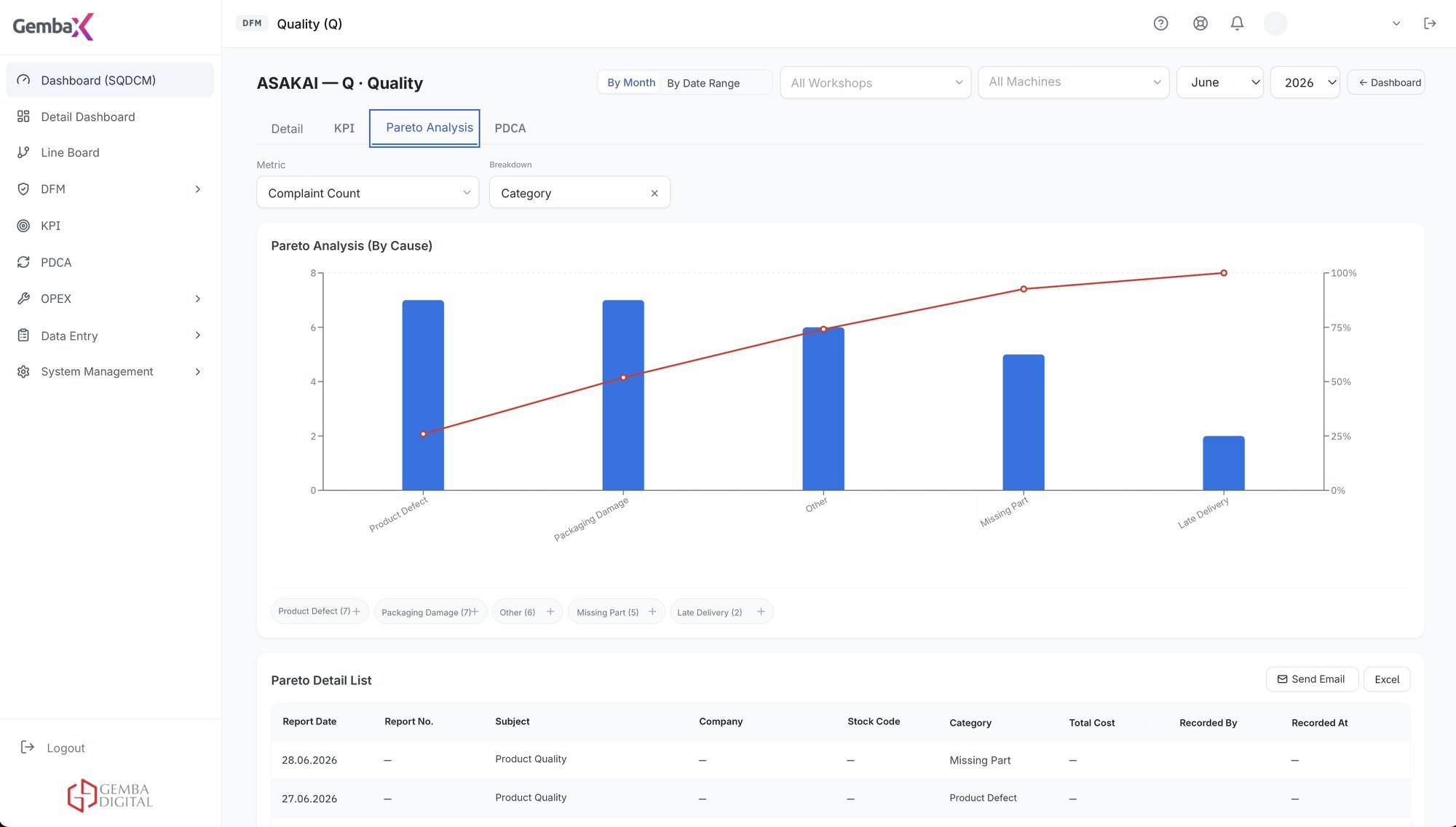
Identify the causes that have the greatest impact on performance
Small deviations in KPIs can lead over time to bottlenecks and delivery delays.
Instead of trying to solve every deviation at once, Pareto lets you focus on the few causes that affect results the most. Gemba OpXSuite generates this ranking automatically from the data.
Talk to an Expert →Automatic deviation detection
The Pareto analysis function detects deviations automatically and gives managers clear visuals.
Cause prioritization
Highlight the causes and categories that warrant deeper root-cause analysis.
Priority improvement
Use ranked findings to select and prioritize improvement projects and reduce hidden costs.
Deviation highlights
Critical deviations are highlighted for review in daily meetings.
One-click report
The generated lists are sent as a report to the relevant manager or process owner with one click.
Prioritize problems
Critical factors are prioritized quickly so teams can select improvement projects.
The daily management cycle in Gemba OpXSuite
Six steps work as one flow: collect data, review plant performance, monitor KPIs, manage daily performance, prioritize deviations and verify the impact of corrective actions.
Data collection
Data flow is established from SQL, Oracle, ERP, SCADA, MES and Excel sources.
Overall factory performance
Daily summary of the factory; indicators outside target stand out.
SQCDM
Indicators are monitored in the structure of safety, quality, cost, delivery and morale.
Daily KPI / performance
Targets are defined, daily data is managed from one place.
Pareto – deviation management
Deviations are ranked by impact and priorities are set.
PDCA
An owner and due date are assigned; the impact is verified in the indicators.
Prioritize improvement using real performance data
Identify the losses with the greatest operational and financial impact.
- Rank losses and deviations using current performance data.
- Managers can align improvement priorities with strategic goals.
- A target structure aligned with the corporate vision is built, linking main goals to process targets.
- Expert team support for managing the right data and building the digital infrastructure.

How is it used on the shopfloor?
Deviations are collected automatically from KPI, task and process data.
Causes are arranged by impact in the Pareto chart; the chart ranks the highest-impact causes first.
In the daily meeting the first few causes are selected and owners are assigned.
The generated list is sent to the relevant manager or process owner with one click.
One shared view, with the right level of detail for every role
- Shopfloor leader. Sees the shift's biggest losses and shows the team the order of priority.
- Quality and process improvement. Verifies root-cause candidates with data and selects improvement projects.
- Department manager. Tracks the trend of their department with daily, weekly or monthly analysis.
- Plant manager. Sees where hidden costs accumulate.
Works with your existing systems
OpXSuite connects to your existing databases and source systems without creating an additional data-entry burden.
Frequently asked questions
What is Pareto Analysis?
Pareto Analysis (the 80/20 Rule) is a decision-making technique showing that the vast majority of effects come from a small number of causes. It is used to focus resources on the areas that will create the highest impact.
What is a target deviation?
It is the difference between the defined KPIs and targets and the actual performance. It helps to diagnose performance problems early, manage risks and identify areas for improvement.
What is deviation management?
It is an approach that aims to systematically eliminate deviations by detecting and analyzing when and why a process moves away from the targeted performance. It covers recording, classification, root cause analysis and corrective/preventive actions.
How does Gemba OpXSuite manage deviations?
By filtering operational data, it automatically determines the root factors that cause a deviation and ranks them on the Pareto screen. When the selected target changes, charts and lists update instantly; analyses can be taken daily, weekly or monthly.
For which periods can Pareto analysis be taken?
It can be taken daily, weekly or monthly; when the target changes, charts and lists update instantly.
How do Pareto and PDCA work together?
Pareto tells you which deviation to prioritize. For the selected deviation, an owner and due date are assigned in the PDCA panel.

Identify the Losses with the Greatest Impact
Our team can help you define the right data model, Pareto categories and improvement workflow.